
CwD Companion
Your surroundings and the whole map of Legends of Fate, beside whatever MUD client you play in.
Version 0.2.1, 22 October 2026. All releases on GitHub
Features
-
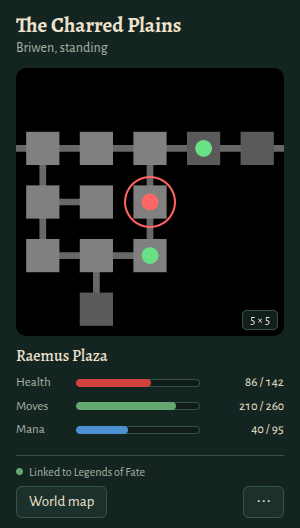
Map of where you are
The rooms around you, five by five like FancyFate (or nine by nine), with exits and other players nearby.
-
Health, moves and mana
Bars that move as you fight, rest and walk, for whichever of your characters is in the world.
-
World map
The whole continent in its own window, coloured by terrain. Drag, zoom, and find any area by name.
-
Skill and spell lookup
Who teaches a skill or spell, where to find them, and what you need first. The same answer as help in the game.
-
Stays beside your client
Above your other windows, or docked to either edge of the screen.
-
Keeps itself current
New versions install themselves on Windows and Linux. On macOS it tells you when one is out.
Pair it with your account
- Download the companion and open it.
- In the game, with any client, type companion. It shows a code like K7QF-M2XP, good once for ten minutes.
- Enter the code in the companion and choose Pair.
That's once per computer: it stays paired through reboots and updates. It only reads what your own client already shows you, and your MUD client connects to the game as it always has. Type companion revoke in the game to unpair every companion on your account.
Opening it the first time
The companion isn't signed by Microsoft or Apple yet, so your computer asks once before it opens it.
- Windows
- SmartScreen says “Windows protected your PC”. Choose More info, then Run anyway. After that it updates itself.
- macOS
- Open it once; when macOS won't, go to System Settings → Privacy & Security and choose Open Anyway. It tells you when a new version is out.
- Linux
- Make the AppImage runnable (chmod +x, or Properties → Allow executing), then open it. It updates itself.
Played with FancyFate?
CwD Companion has a classic mode that works like FancyFate did: your client connects through the companion, and you type config mapping in the game. Choose it in the companion's Settings.
It also offers a new and much better way to keep a companion beside your MUD. It pairs with the account you sign in to with Discord: type companion in the game for a one-time code, and the companion trades it for a token. Once paired, it takes its information straight from the server instead of relying on a proxy connection the way FancyFate did, so your client connects to the game as it always has.
Want the original? Download FancyFate, the preserved Windows client. It was made for Legends of Fate only, the classic MUD CwD now hosts.